
LS 25 AutoSwitch V1.0.0.5
AutoSwitch is a companion mod that automates tire pressure and differentials, making traction realistic. It makes Variable Tire Pressure, Enhanced Vehicle, MoreRealistic, Mud System Physics, Tractor Terrain Dynamics and AutoDrive work together without modifying or disabling any of these mods.
Objective: make the game more realistic and efficient.
Features:
Tire pressure: with AutoDrive / Courseplay, deflation in the field and inflation on the road; in manual driving, Automatic or Manual mode.
Differentials (Enhanced Vehicle): rear lock at 15% wheel slip, front lock at 30% (adjustable), 4×2 only on asphalt and concrete, 4×4 elsewhere.
Steering: 90% in 4×4; locks are disengaged when the wheels are turned and refused with the alert “Straighten the wheels”.
Traction (MoreRealistic): loss on wet ground over 5 levels, VTP field bonus capped (+15%, +20% with dual wheels), differential lock bonus, Use Your Tyres wear taken into account.
Dual wheels: actual width taken into account by Mud System Physics, better traction on wet ground.
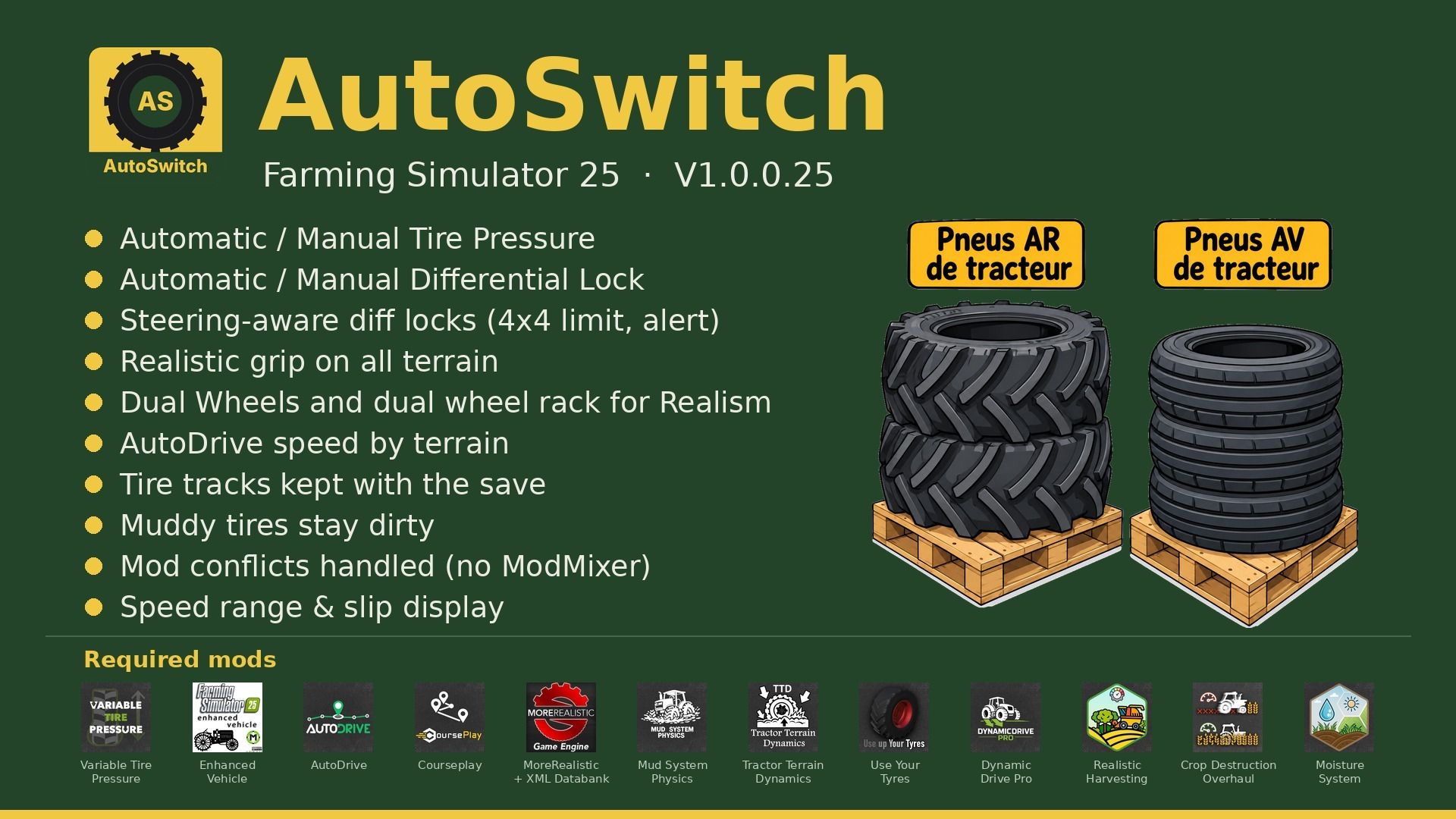
Rear dual-wheel pallets (BKT 650/65R42) and front dual-wheel pallets (BKT 540/65R30): tire-by-tire installation (15 minutes of game time per tire).
AutoDrive speed according to the terrain (field, path, road), adjustable in 2 km/h increments.
Display: speed range and top-down tractor view near the speedometer, slip of each wheel (turns are not counted), movable panels controlled with the mouse.
Sleeping: time in hours (+0 to +23 h) and days (+0 to +7), waking at 8 a.m. when using days.
Lights of other vehicles visible five times farther away and twice as bright (adjustable).
Mud: MSP → TTD bridge (no doubled resistance), wet paths remain drivable.
Tire tracks saved with the savegame; muddy tires remain dirty (1 hour on the road).
Tools remain stable when stopped; mud also slows trailers and tools.
Conflicts between mods arbitrated by AutoSwitch (ModMixer is no longer required).
Sowing: seed protection, filling with the cover closed, reseeding over crushed strips.
Settings: Settings > General > AutoSwitch.
Required mods: Variable Tire Pressure, Enhanced Vehicle, AutoDrive, Courseplay, MoreRealistic + XML Databank, Mud System Physics 1.3.6, Tractor Terrain Dynamics 1.0.3.7, DynamicDrive Pro, Use Up Your Tyres, Realistic Harvesting, Crop Destruction Overhaul, Moisture System. If a mod is too old, AutoSwitch does not start and reports it in-game.
New in V1.0.0.42: compatible with MSP 1.3.6 / TTD 1.0.3.7, version checks, wheel-by-wheel slip, top-down tractor view, 4×2 only on hard surfaces, sleeping in hours and days, lights of other vehicles, new pallet icons.
CC BY-NC-SA 4.0 license.
Required mods: Variable Tire Pressure, Enhanced Vehicle, AutoDrive, Courseplay, MoreRealistic + XML Databank, Mud System Physics 1.3.6, Tractor Terrain Dynamics 1.0.3.7, DynamicDrive Pro, Use Up Your Tyres, Realistic Harvesting, Crop Destruction Overhaul, Moisture System. If a mod is too old, AutoSwitch does not start and says so in-game.
V1.0.0.5
Wheel slip: each wheel is compared to its own ground speed; turning no longer counts as wheel slip (display and automatic differential locking); in 4×2, no more displayed slip on the free front wheels
Display: top-down view of the tractor near the speedometer (axles locked in red, 4×4 in green), with the slip of each wheel, one slip indicator per locked axle
Display: the tractor and the speed range are two separate blocks, each movable with the mouse (position saved)
Transmission: 4×2 only on hard surfaces (asphalt, concrete), 4×4 on paths, grass and sand as in the field
Sleep: two sliders, Time in hours (+0 to +23 h) and Time in days (+0 to +7); with days, wake up at 8 a.m. on the last day (+ the selected hours)
Sleep: the player being stuck upon waking after several days has been fixed (the “Market News†window from Dynamic Market was invisible); it now appears upon waking
Lights: headlights, lights and beacons of other vehicles are visible 5 times farther away and twice as bright (adjustable in the menu, x1 = base game)
New shop icons for rear and front tire pallets