LS 25 (Blender Add-on) UV Position Tool V1.0.0.0

LS 25 Other


LS 25 (Blender Add-on) UV Position Tool V1.0.0.0

First public release of the FS25 UV Position Tool for Blender.

Features :
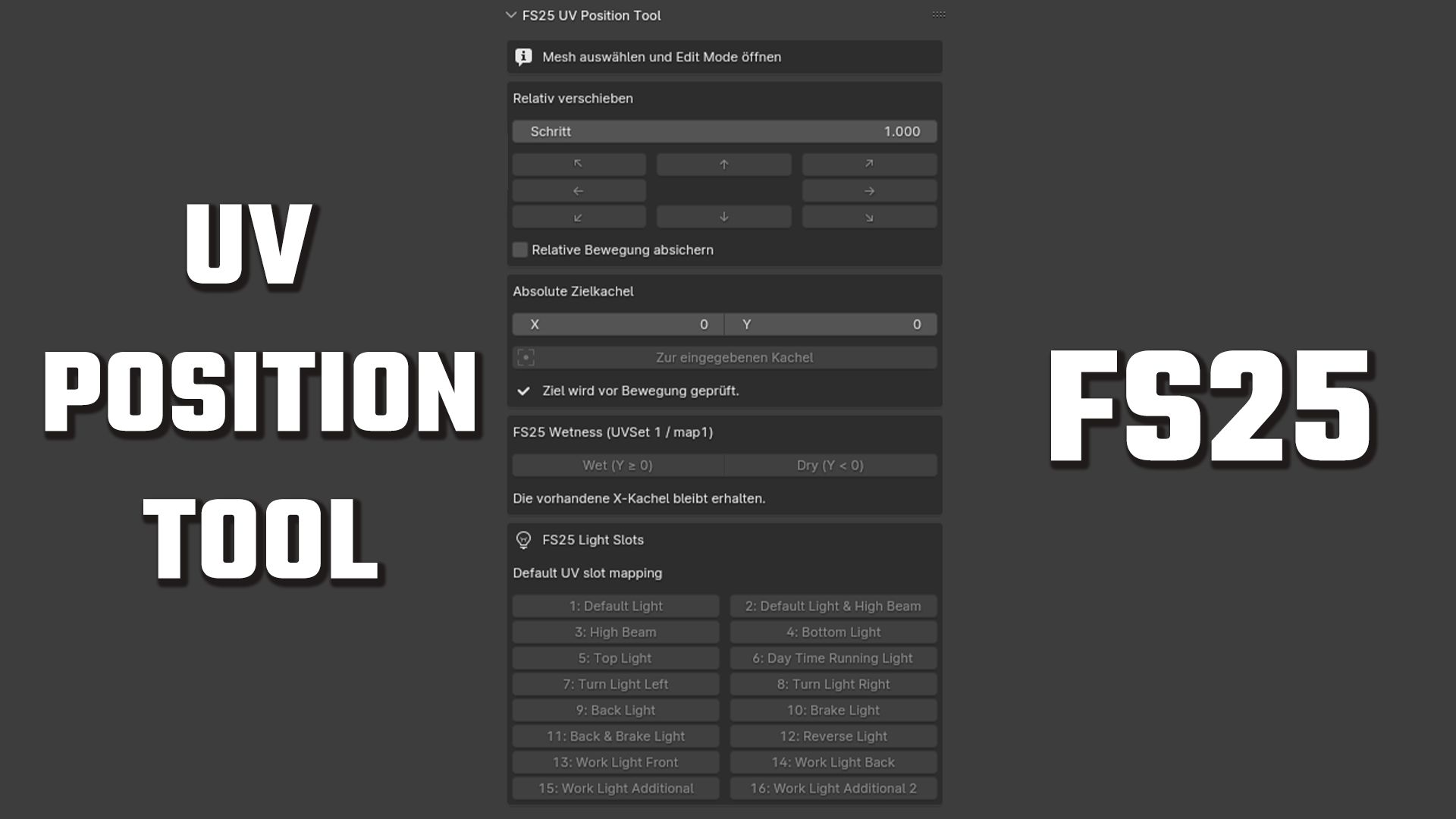
Relative UV movement in eight directions
Configurable movement step
Absolute UV tile positioning
Wet and dry row helpers
Direct access to all 16 Farming Simulator 25 light slots
Safety check for selections spanning multiple UV tiles
Multi-object Edit Mode support
Undo support

Compatibility:
Blender 4.0 and newer
Tested with Blender 4.0, 5.1.2 and 5.2.1 LTS

Installation:
Download fs25_uv_position_tool_v1.0.0.zip below.
In Blender, select Edit → Preferences → Add-ons → Install…, choose the ZIP file and enable the add-on.

Credits:
Maddog Design
1 Star2 Stars3 Stars4 Stars5 Stars (No Ratings Yet)


Why to use Farming Simulator 19 mods | Farming Simulator 22 mods?
Even though Farming Simulator 2019 / Farming Simulator 2022 is a great game, you can make it even more astonishing by installing Farming Simulator 19 mods / Farming Simulator 22 mods. There are plenty of mods for every part of the game so you can change or integrate whatever you like. All the FS 19 mods / FS 22 mods are absolutely costless, so you won’t spend anything trying to change the game according to your own wishes. Our main goal is to keep Farming Simulator 19 / Farming Simulator 22 community happy where everyone has a possibility to implement their ideas and enjoy playing a perfect game. If something looks disturbing, bothers you or maybe you just need to integrate more tools and supplements, simply use FS 2019 mods / FS 2022 mods. Not many games provide an opportunity to change it by individual needs, but Farming Simulator is different. You can do whatever you want just by installing LS 19 mods/ LS22 mods so it’s time for you to take action and fulfill even craziest ideas!


You may also like...

Leave a Reply